Informative
What business information should you keep private?
Not everything needs locking away. A simple three-level sort (public, internal, private) tells your team what needs care and what doesn't.
Zinwe team · · 3 min read
Picture a team photo taken for the office's social media page. Everyone is smiling. Behind them, on the whiteboard, is next month's pricing for three big clients. Nobody meant to share it. Nobody had ever said it was private.
That is the real gap in many small offices. People aren't careless with confidential business information. They just haven't been told which information it is.
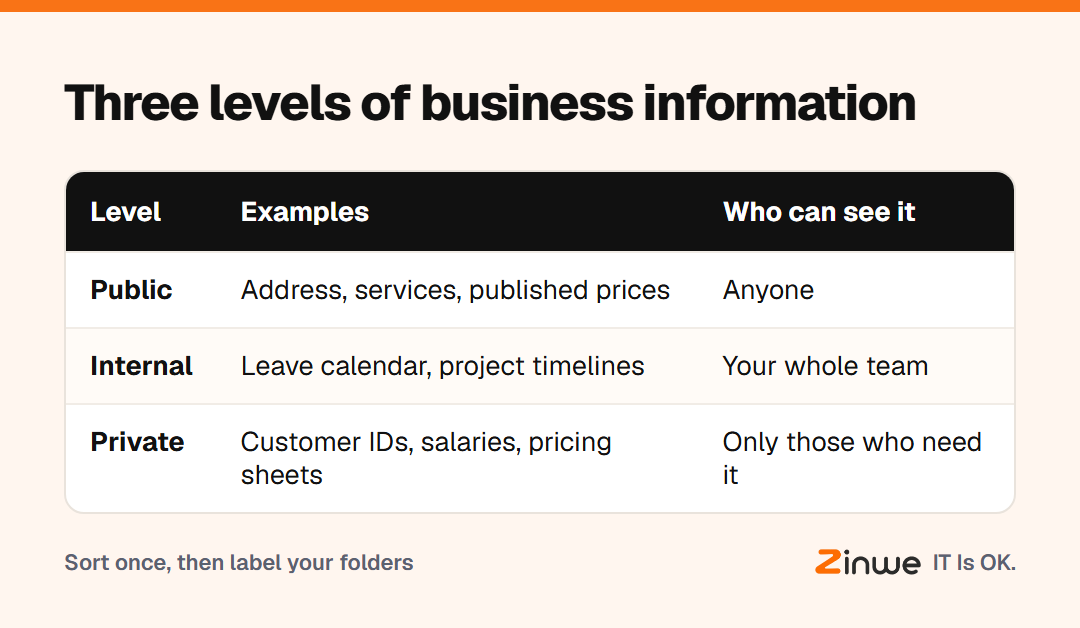
Short answer: sort everything into three levels. Public is anything you would print on a brochure. Internal is fine inside the team but not outside it. Private is anything that would hurt a customer, an employee or the business if it got out. Only the private level needs strict rules.
What counts as confidential business information?
Private information is usually one of these:
- Customer details: phone numbers, addresses, ID copies, bank details
- Money: pricing sheets, margins, bank statements, salaries
- People: employee records, appraisal notes, personal documents
- Deals: proposals, contracts, supplier rates, quotes in progress
- Access: passwords, OTPs (the one-time codes sent to your phone), admin logins
Not sure about something? Ask one question: would I be uncomfortable if a stranger or a competitor read this? If yes, treat it as private.
Internal vs public information: where is the line?
Internal information is the everyday stuff. The leave calendar, project timelines, how-to notes, the client list without contact details. It isn't secret, but it shouldn't sit on your website either.
Public information is what you already share by choice: your address, your services, published prices, your team page.
Internal information rarely causes trouble on its own. Private files hidden inside internal places do. A shared "General" folder that also holds the salary sheet is the classic case.
How do you put the sort into practice?
Take a 9-person CA firm in Pune. The partners spent one afternoon on their shared drive. They made three top-level folders: Public, Team and Restricted. Client tax files, bank statements and salary sheets went into Restricted, open only to the two partners and the senior accountant. Everything else stayed where the team could reach it.
Then they gave the team one rule: Restricted files don't leave the office on pen drives or personal email. One folder and one rule were easier to remember than a long policy.
In short
- Three levels: public, internal, private
- Only the private level needs strict rules
- Give private files their own folder and a short access list
Once you know which files are private, the next question is where they go. On Windows PCs, Zinwe sends a plain-English alert when files are copied to a pen drive or leave as a large email attachment. Start free for 3 PCs, or read how to protect customer information in a small office.