Informative
What you should never send over email or chat
Messages get forwarded, screenshotted and kept for years. A short never-send list, and what to do instead, keeps secrets out of your chats.
Zinwe team · · 3 min read
A message feels like a conversation. It isn't. It is a copy that sits on your phone, their phone, every backup and every device where either of you is signed in. It can be forwarded in a tap and screenshotted in a second.
Short answer: some things should never be sent as sensitive information over email or chat: passwords, OTPs, full card numbers, full ID numbers and whole customer lists. For each one there is a safer way that is almost as quick.
What sensitive information should never go over email or chat?
Keep this list short enough to remember:
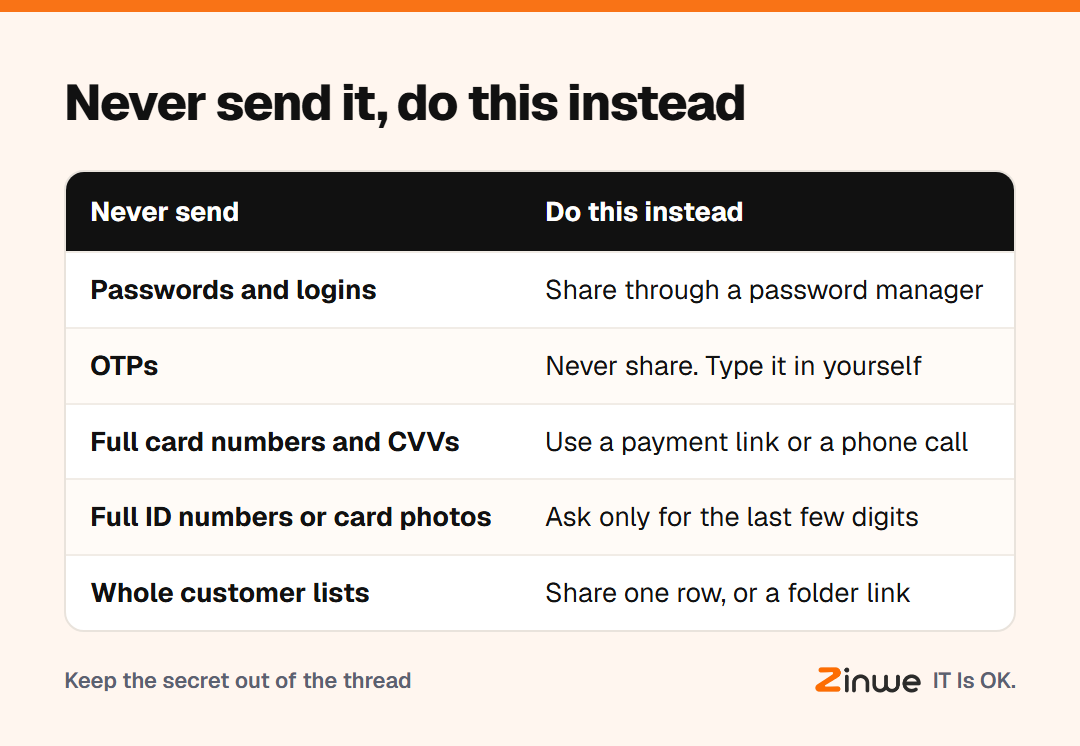
- Passwords and logins. Sharing passwords by chat leaves them readable in the thread forever.
- OTPs. A one-time code is the key to an account for a few minutes. Nobody genuine, including your bank, should ask you for it.
- Full card numbers and CVVs. A card's security code is never needed in a message.
- Full ID numbers. Aadhaar, PAN or Social Security numbers, and photos of the cards.
- Whole customer lists. A spreadsheet of names and numbers, sent "for reference".
What should you do instead?
- Logins: share them through a password manager, an app that stores logins and shares them safely.
- OTPs: don't pass them on at all. The person who needs the account should get their own access.
- Card details: send a payment link, or take them over a phone call and don't write them down.
- ID numbers: ask only for the last few digits if that is enough to confirm someone.
- Customer lists: share the one row that's needed, or a link to a folder with named access.
What about WhatsApp and work chat?
Knowing what not to share on WhatsApp matters most, because it is where work and personal life mix. Personal groups, family phones and old devices can all hold copies of your work messages.
Picture a 10-person property management firm in Florida. A new hire needs the login for the rent portal. The quick way is to text it. Instead, the office manager adds the login to the team's password manager and shares it there. The new hire can sign in, and nothing sits in a chat history.
Secure messaging at work isn't about a special app. It is about deciding what a chat is for. Work chat is great for tasks, quick questions and updates. It is not a safe for secrets.
In short
- Never send passwords, OTPs, full card or ID numbers, or customer lists
- Use a password manager, a phone call or a shared folder instead
- Treat chat as the place for work notes, not secrets
Zinwe's team chat follows the same idea. It's for notes like Task for today, Quick question and Call me, sent to an employee's Windows PC. See how to chat with your team in Zinwe, read password habits your team will actually follow, or start free for 3 PCs.