Informative
Why small businesses can't ignore device security
Your files may sit in the cloud, but they are opened, copied and sent from a PC. Four basics keep that PC from becoming the weak spot.
Zinwe team · · 3 min read
"Everything is in the cloud now," an owner says, and it sounds reassuring. But look at how the work happens. A file is downloaded to a PC, edited in Excel, saved to the desktop, attached to an email or copied to a pen drive. Every one of those moments happens on a device.
Short answer: business device protection matters because the PC is where your data is opened, copied and sent. If the PC is out of date, open to anyone or full of unknown software, the best cloud settings won't help. Four basics cover most of it: updates, limited admin rights, a lock screen and knowing what's installed.
Why is the PC the weak spot?
Big cloud services have whole teams keeping them patched. Your office PC is looked after by whoever has time. So the gaps tend to sit on the device, not in the cloud:
- An old copy of a customer list in the Downloads folder
- A remote-access tool installed for one support call
- A login that never locks when someone walks away
That is what "endpoint protection" means in plain words: protecting the endpoint, the actual PC or laptop at the end of the line.
What are the four basics of business device protection?
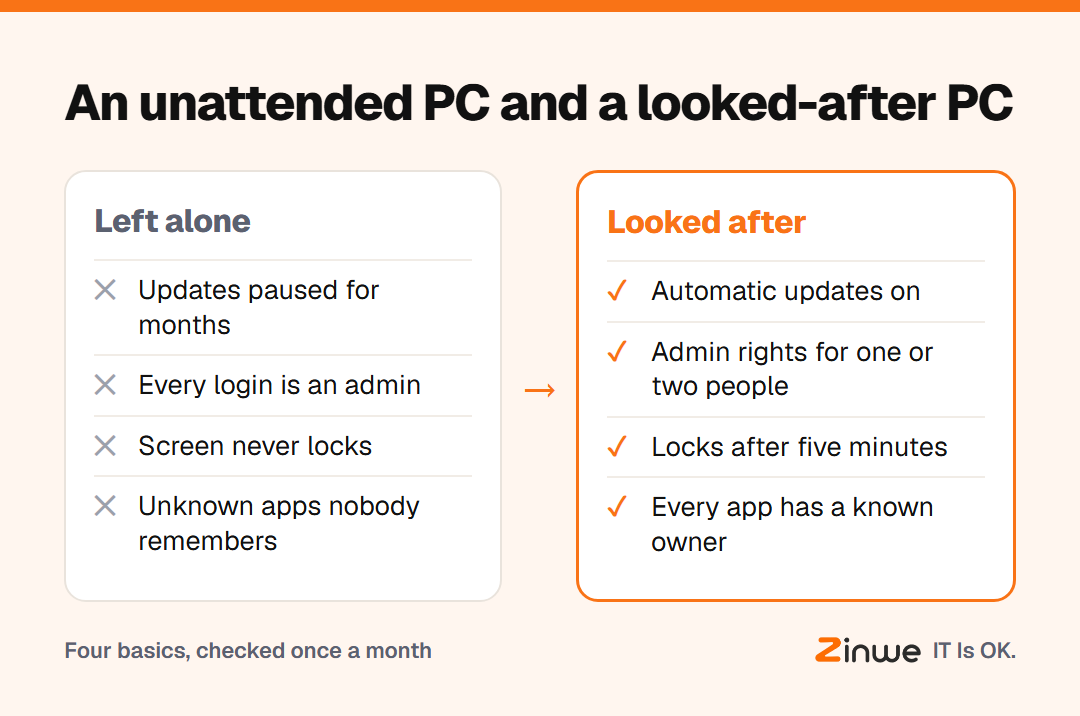
- Updates on. Windows updates fix known holes. Pausing them for months leaves the door open.
- Admin rights for few. Admin rights let someone install software and change settings. Daily logins don't need them.
- Lock screen on. The PC should lock itself after a few minutes, and ask for a password or PIN to open.
- Know what's installed. If you don't recognise an app, find out who added it and why.
Antivirus matters too, and Windows includes one. But antivirus alone doesn't tell you who installed what or where files went.
What does good company laptop security look like?
Picture a 20-person BPO in Noida. The office manager takes admin rights off daily logins, turns on automatic updates and sets screens to lock after five minutes. Once a month she checks the installed apps on each PC. Nothing changes for staff except one extra password prompt now and then.
For a ready list to work through, see our monthly data safety checklist.
In short
- Data in the cloud is still opened and copied on a PC
- Updates, few admins, a lock screen and a known app list cover most office PC security
- Check each PC once a month
Zinwe is not antivirus, but it handles the "know what's installed" part for Windows PCs: you get a plain-English alert when new software appears or a remote tool runs. Start free for 3 PCs.