Informative
How to review the data your business collects
You can't protect data you don't know you have. One table with five columns maps it all, and it takes a single afternoon.
Zinwe team · · 3 min read
Ask yourself one question: what data do we collect? Many owners answer "names and phone numbers" and stop. Then they remember the PAN copies, the bank details for refunds, the WhatsApp groups and the signed forms in the scanner folder.
A data inventory for a small business is simply that list, written down properly. It sounds dull. It is also one of the most useful pages you can own, because every other data decision starts from it.
Short answer: make one table with five columns: what, why, where, who sees it and how long you keep it. Fill one row for each kind of data. Block one afternoon, invite whoever handles accounts and sales, and you will finish before tea.
Why map business data at all?
You can't protect what you can't see. A map shows you three things quickly: data you collect but never use, data stored in too many places and data that too many people can open. Each of those is an easy fix once it is on paper.
How do you build a data inventory for a small business?
Step 1: walk through a customer's journey
Follow one customer from first enquiry to final invoice. Note every detail you ask for along the way: contact details, ID, addresses, bank details, signatures.
Step 2: fill the five columns
For each kind of data, write what it is, why you need it, where it lives (be specific: "Accounts PC" beats "the computer"), who can see it and how long you keep it.
Step 3: circle the surprises
Mark any row where "why" is blank, "where" has more than two places or "who" says "everyone". Those circles are your to-do list.
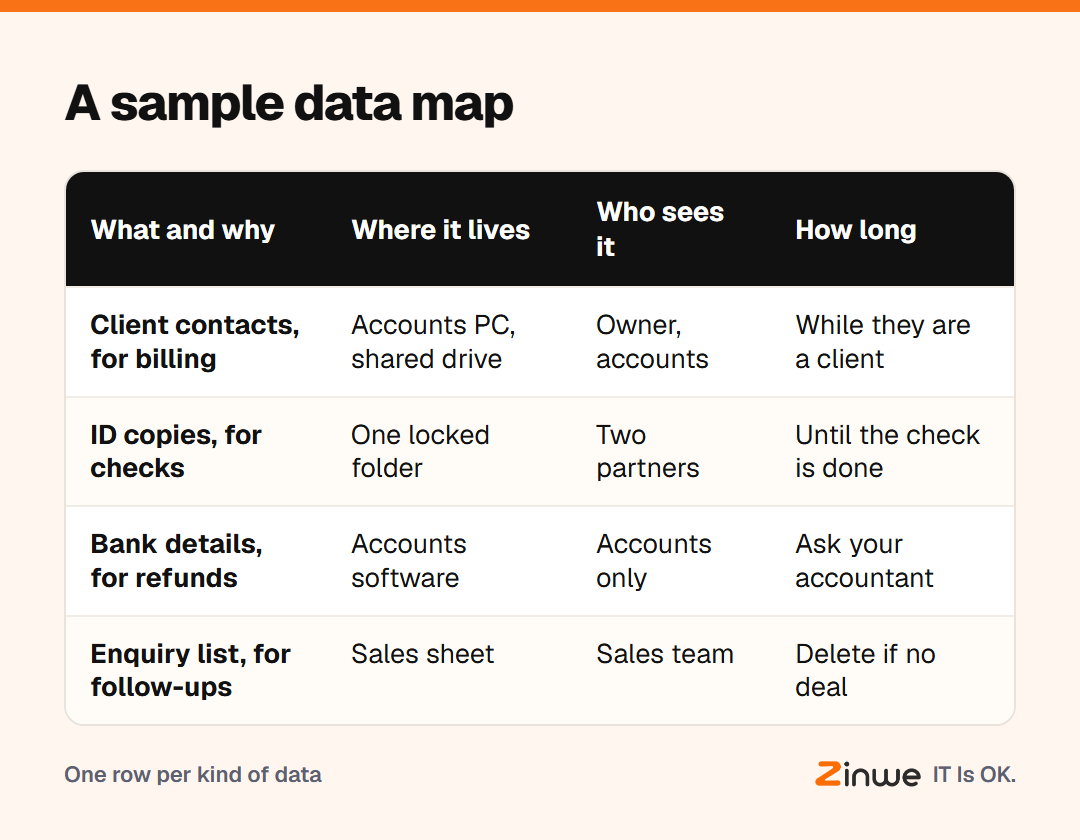
What does a finished data map look like?
Picture an 11-person CA firm in Lucknow. Their table has nine rows. Client PAN and Aadhaar copies turn out to live in three places: the shared drive, two partners' inboxes and an old pen drive. Bank details for refunds are visible to the whole office. Nobody can say why the firm still collects clients' dates of birth.
Three circles, three fixes: one home for ID copies, bank details limited to accounts, and the date of birth field dropped from the form. The customer data audit took one afternoon. Next year's review will take less.
In short
- One table: what, why, where, who sees it, how long
- Walk a customer's journey to find every detail you collect
- Circle the blanks and the "everyone" rows, and fix those first
Once you know what to keep, our guide on how much customer data to keep helps you trim the rest. For the "where" column, Zinwe shows when data moves off Windows PCs by pen drive, network share or large email attachment. Start free for 3 PCs.