Informative
How much customer data does your business need to keep?
Every old spreadsheet is one more thing to protect. Sort your records into keep, archive and delete, and run one clean-up a year.
Zinwe team · · 3 min read
Here is a data safety tip nobody talks about: the file you deleted can never leak. Every old enquiry list, every export from 2021 and every scanned ID copy is one more thing you have to protect.
Many small businesses never decide on customer data retention. They just keep everything, because deleting feels risky and keeping feels free. It isn't free. It is just quiet.
Short answer: keep what you use, archive what you might need, and delete the rest. Sort your common records into those three piles once, then repeat a short clean-up every year. For accounts and tax papers, ask your accountant how long to hold them, and follow that.
Why does keeping less data lower your risk?
Fewer copies mean fewer places for things to go wrong. A lost laptop with this month's work is a bad day. A lost laptop with six years of customer exports is a much worse one.
Keeping less also makes the rest easier. You can check who sees a small folder in minutes. A huge one nobody understands simply never gets checked.
A simple customer data retention sort: keep, archive, delete
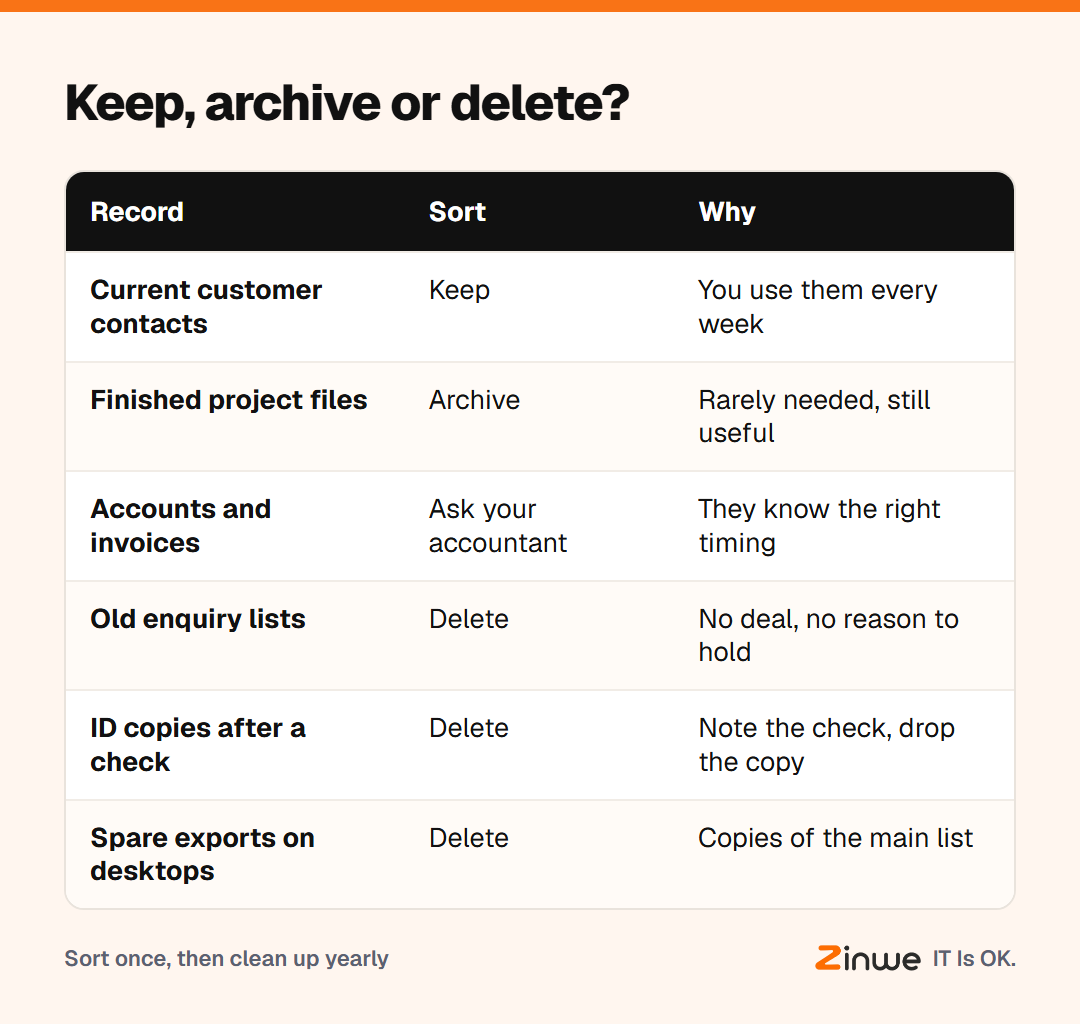
- Keep: records you use every week, in one main home. Current customer contacts, open orders, active projects.
- Archive: records you rarely open but may need. Finished project files go into one locked-down folder that only one or two people can open.
- Delete: anything with no job left to do. Old enquiry lists that never became customers, copies of ID documents once a check is done, and spare exports sitting on desktops.
How do you run a yearly data clean-up?
Take a 6-person event planning company in Chicago. Each January, the owner blocks one afternoon.
Step 1: list the piles
She lists where customer data sits: the bookings sheet, the shared drive, email folders and the two office PCs.
Step 2: sort each pile
Each folder gets a label: keep, archive or delete. If nobody can say why a file exists, it goes in delete.
Step 3: delete old customer data properly
She empties the recycle bin, clears the downloads folders and deletes old email attachments she had saved as files. Spare pen drives get wiped.
Step 4: note what you did
One line in a notebook: date, what was archived, what was removed. Next January starts from that note.
In short
- Data you no longer hold cannot leak, so keep less data on purpose
- Sort records into keep, archive and delete
- Run one data clean-up a year, and check timings for financial records with your accountant
Clean-ups shrink the pile, but copies grow back fast. Zinwe tells you when large amounts of data are copied from Windows PCs to pen drives or network shares. See how to stop data leaving on pen drives, our post on lowering the risk of a customer data leak, or start free for 3 PCs.