Informative
A 15-minute data protection checkup for your business
Set a 15-minute timer. Five minutes on people, five on PCs, five on files. You finish with a short list of fixes, not a headache.
Zinwe team · · 3 min read
You don't need a free afternoon to find out how safe your business data is. You need a notepad, a cup of tea and the timer on your phone.
Many owners put off a data protection checkup because it sounds like a project. It isn't. It is three quick looks, and the goal today is not to fix everything. The goal is to know where you stand.
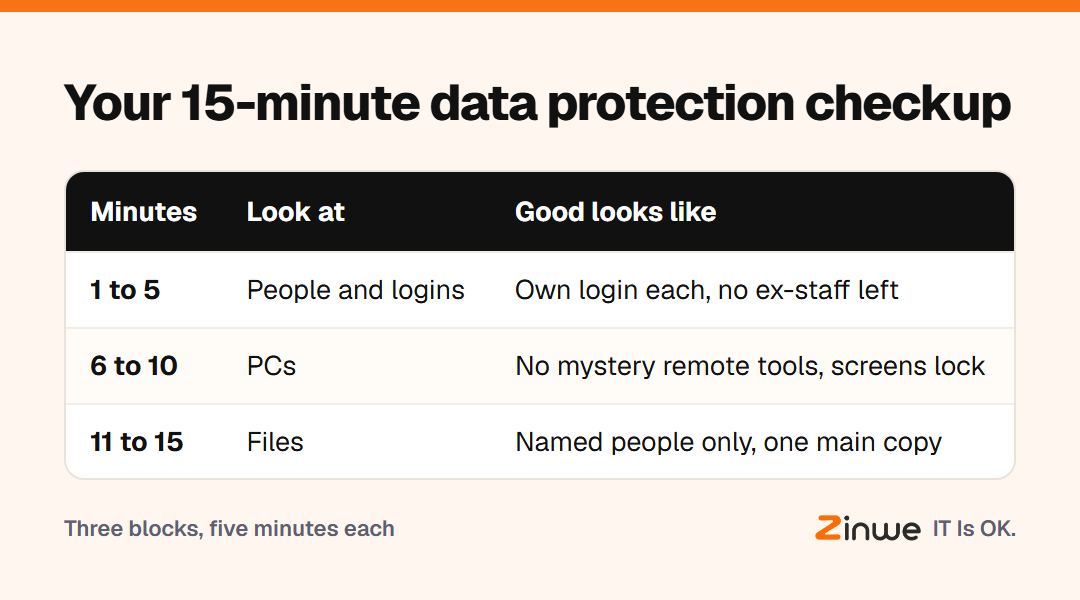
Short answer: split 15 minutes into three blocks. Five minutes on people, five on PCs, five on files. Compare what you find with what "good" looks like below, and write down anything that doesn't match. That list is your to-do for the month.
Minutes 1 to 5: who has access?
Open your email admin page, or your list of staff accounts, and read it top to bottom.
Good looks like:
- Every name on the list still works for you
- Each person has their own login, not a shared one
- Only one or two people can add or remove accounts
If a former employee's account is still open, that goes to the top of your list.
Minutes 6 to 10: what is on your PCs?
Walk round the office, or ask people working from home to check. Look at each PC's taskbar and its list of installed apps.
Good looks like:
- No remote-access tool (software that lets someone control a PC from elsewhere, such as AnyDesk) that nobody can explain
- Screens lock when people step away
- You have decided whether pen drives are allowed, and the team knows the answer
Minutes 11 to 15: where do your files live?
Open your cloud drive and check the sharing on your three most important folders: usually the customer list, accounts and contracts.
Good looks like:
- Each folder is shared with named people, not "anyone with the link"
- There is one main copy, not five versions on five desktops
- Someone can tell you when the last backup ran
What does a data protection checkup turn up?
Picture a 9-person travel agency in Mysuru. The owner runs this quick security check on a Wednesday morning. Under people, she finds a former intern's email still active. Under PCs, one machine still has AnyDesk from a vendor visit last year. Under files, the client folder is open to anyone with the link.
Three findings, three small fixes, all done by Tuesday. All she did was look. If you want a version to print and pin up, use our 10-point data protection checklist.
In short
- Fifteen minutes, three blocks: people, PCs, files
- Compare each with what good looks like, and note the gaps
- Fix the list over the next week, not all in one go
Want the PC part to keep running between checkups? Zinwe sends a plain-English alert when a remote-access tool or a pen drive shows up on a Windows PC. Start free for 3 PCs, or see how to block AnyDesk and remote access tools.