Informative
How to review employee access before it's a problem
Access piles up quietly: a folder here, an admin role there. A four-step review every quarter, with one simple table, keeps it in line with each job.
Zinwe team · · 3 min read
Access is easy to give and easy to forget. Someone covers for a colleague on leave and gets the accounts folder. A new tool arrives and everyone is made an admin "for now". A year later, the intern can see payroll and nobody remembers why.
Short answer: user access management in a small business is a short review every quarter. List your systems, list who has access to each, decide keep, reduce or remove for every row, then make the changes and date them. One table and about an hour does it.
Why does access creep up over time?
Because giving access solves a problem today, and removing it solves nothing you can see. So employee permissions only ever grow. A regular review is the one moment you deliberately shrink them back.
What is a simple user access management routine?
Four steps, the first week of every quarter.
1. List your systems
Email, cloud drive, accounting software, bank portal, CRM, social pages, website, office Wi-Fi. Include the small tools too, such as the design app or the shared calendar.
2. List who has access to each
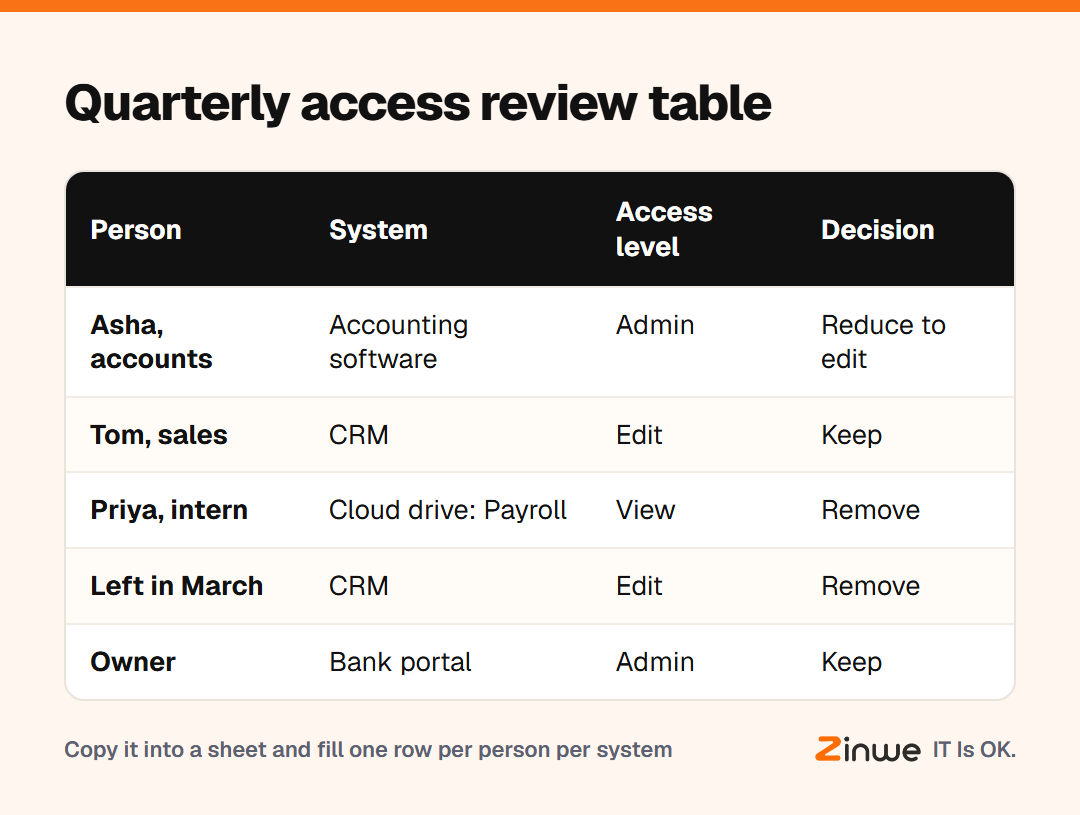
Open the users or members page in each tool. Write each person, the system and their level: view, edit or admin.
3. Decide each row
For every row, ask one question: does their current job need this? Mark it keep, reduce (admin to edit, edit to view) or remove.
4. Make the changes and date them
Change the settings the same day. Write the date at the top of the table, so next quarter you start from a known point.
What does an account access audit look like in a small firm?
Take an 8-person insurance agency in Phoenix. The office manager runs the four steps on the first Monday of January. She finds the part-time bookkeeper still has admin rights in the accounting software from a year-end rush, and two people who left still appear in the CRM. Three rows go to reduce, two to remove. The whole review takes fifty minutes.
Before granting anything new between reviews, run through six questions before giving file access. For a one-time look at your most powerful logins, see who can access your company data.
In short
- Access only grows unless you shrink it on purpose
- Four steps: list systems, list people, decide each row, change and date it
- Repeat every quarter with the same table
Zinwe won't review your cloud permissions, but on Windows PCs it alerts you when new software appears, which is often the first sign of a new tool to add to your access review checklist. Start free for 3 PCs.