Informative
Who can access your company data right now?
Your business has keys: email admin, cloud drive owner, bank login, remote-access tools. A 30-minute audit tells you who holds each one today.
Zinwe team · · 3 min read
Every business has a bunch of keys. Not the brass ones on your desk: the logins that open everything else. The email admin account. The cloud drive owner. The bank portal. The domain login nobody has used since the website went live.
Many founders could not say, today, who holds each one.
Short answer: access control for small business starts with a list of your master keys and the name next to each. Write down every account that can open, change or delete company data, check who holds it now, and take back any key held by someone who no longer needs it.
Which keys does a small business have?
Six kinds, in a typical office:
- Email admin: can reset every staff password, and so get into any mailbox.
- Cloud drive owner: can see and share every folder.
- Bank and payment logins: including the UPI and net banking users.
- Domain and website login: controls your email and site.
- Shared passwords: the ones on a sticky note or in a group chat.
- Remote-access tools: AnyDesk or similar on a PC is a key to that PC.
How do you check access control in a small business?
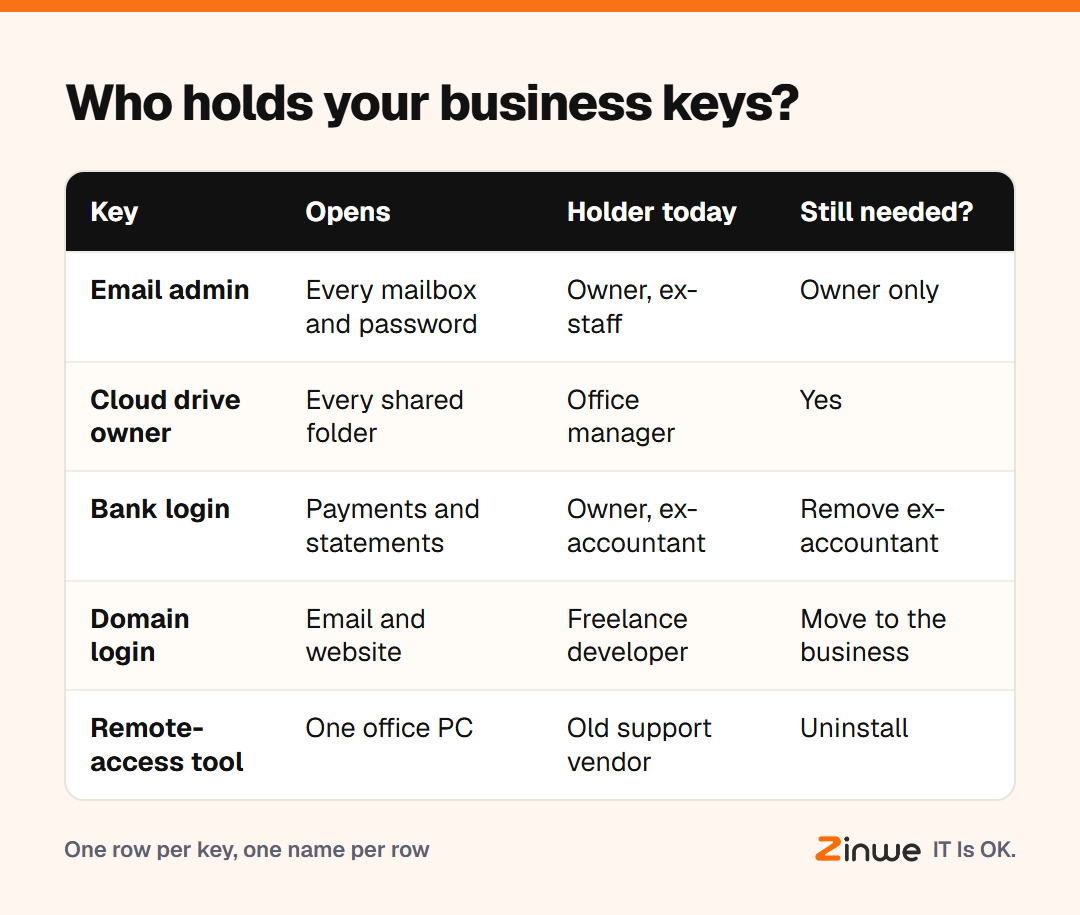
Block 30 minutes and fill in one row per key:
- What the key opens
- Who holds it today, by name
- Whether they still need it
- What you will change, and by when
The rule behind it has a formal name, least privilege access, but it is simple: each person gets the keys their job needs, and no more. Be especially careful with ex-staff. A former accountant who still has the bank login is a surprise you want to find now, not later. Our article on old employee accounts covers that sweep in detail.
What does a good result look like?
Take an 11-person export house in Ludhiana. The founder lists the keys and finds three gaps. The email admin login is shared by both directors and an ex-employee. A freelance web developer still owns the domain account. AnyDesk sits on the reception PC from a support visit last year.
She keeps two email admins, herself and her co-director, each with their own login and 2-step verification (a code on the phone as well as a password), so one lost phone never locks the company out. She moves the domain into the company's name and removes AnyDesk. That is solid business account security for a business that size. For the email side, see three email settings to turn on today.
In short
- List your master keys: email admin, cloud owner, bank, domain, shared passwords, remote tools
- Write one name next to each and ask if they still need it
- Take back keys from ex-staff and freelancers first
Zinwe won't manage logins, but it does watch one kind of key: it alerts you when AnyDesk or similar remote-access tools run on a Windows PC, and can block them. Start free for 3 PCs.