Informative
How to find security gaps without an IT team
You can find most security gaps yourself in an afternoon. Walk the office, open each PC, check the accounts, and give every area a colour.
Zinwe team · · 3 min read
Many owners assume a security review needs an expert with a laptop full of tools. So it never happens. Meanwhile, the gaps that matter most are visible to anyone who looks: a PC with no password, an app nobody recognises, an account for someone who left in March.
Short answer: you can run a small business security audit yourself. Walk the office, open each PC, check every account, and score each area red, amber or green. Fix the reds first. It takes one afternoon and no technical background.
What goes on an IT security checklist for small business?
Keep it to three walks.
1. Walk the office
- Is any PC left unlocked when its owner steps away?
- Are passwords written on notes near screens?
- Are there pen drives or old laptops lying around with no owner?
2. Open each PC
- Open the list of installed apps. Do you recognise every one?
- Is there a remote-access tool, such as AnyDesk, that nobody uses now?
- Are Windows updates on, or paused?
3. Check the accounts
- Does each person have their own email and cloud login?
- Who is an admin, meaning who can add users or change settings?
- Is anyone who has left still able to sign in?
How do you score what you find?
Use three colours. Green: fine as it is. Amber: works, but it relies on luck. Red: fix this week.
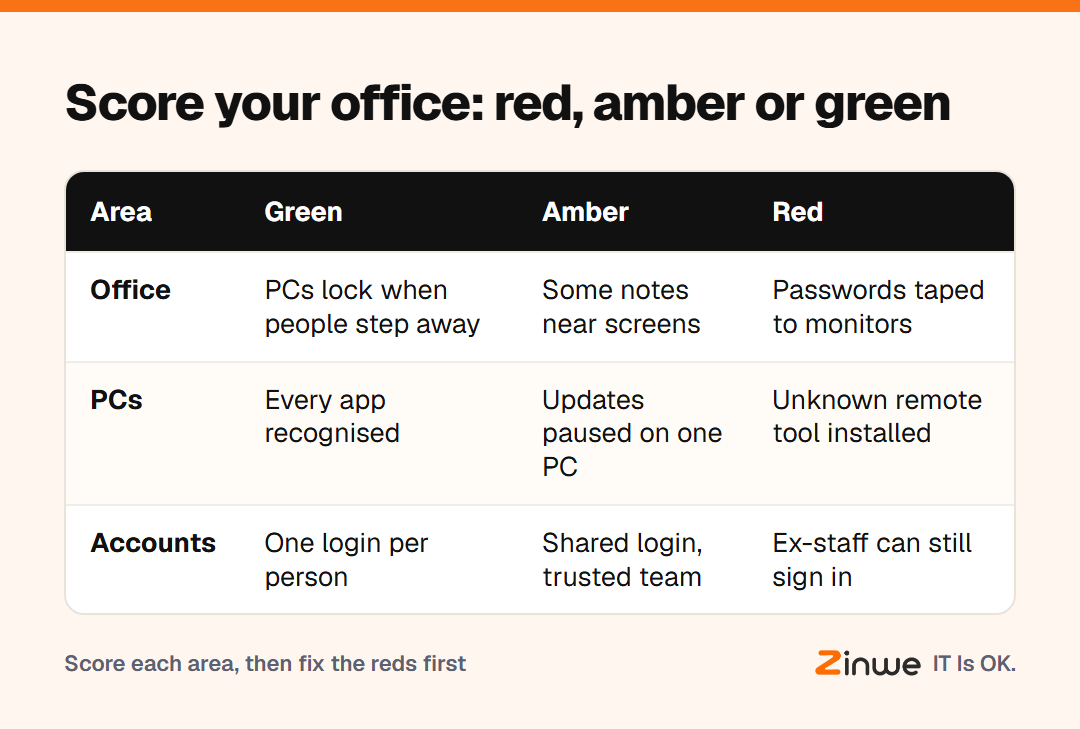
Be honest with amber. "We share one login, but we trust each other" is amber, not green. The point of the colours is to make cybersecurity gaps easy to rank, not to feel good.
What does this look like in practice?
Take an 11-person design studio in Austin. The owner spends a Thursday afternoon on the three walks. She finds two reds: a former freelancer still has cloud drive access, and one PC has an unknown screen-sharing app. Four ambers, mostly shared logins. Everything else is green.
She removes the freelancer that evening, uninstalls the app the next morning, and puts the ambers on next month's list. That is a complete IT security assessment for a team her size. For the account side in more depth, see old employee accounts and the risk they carry.
In short
- Three walks: the office, each PC, every account
- Score red, amber or green, and be strict with amber
- Fix reds this week and repeat the walk every quarter
Zinwe can make the PC walk shorter: it tells you when new software appears on a Windows PC, so a strange app never sits there for months. Start free for 3 PCs, or see how to see new software installed on office PCs.