Informative
How to manage office PCs when your team works anywhere
When laptops live in homes, branches and the office, you need three things: a list of every PC, one set of rules for all of them and one place to see alerts.
Zinwe team · · 3 min read
Quick test: how many computers does your business own, and where is each one right now? If the honest answer is "about fifteen, mostly with people", you are not alone. Once laptops leave the office, they also leave your line of sight.
Short answer: business device management for a small team needs three things, not an IT department. A simple list of every PC, one set of rules that applies wherever the PC is, and one place where you see anything that needs attention.
Why does business device management get harder with remote teams?
In the office, you can walk past a desk and notice a pen drive or an unfamiliar app. At home or in a branch, you can't. Problems don't grow faster outside the office. They just stay hidden longer.
How do you manage employee laptops in three steps?
1. Keep a company device inventory
A device inventory is simply a list. One row per PC:
- PC name, as it shows in Windows
- Who uses it
- Where it usually is: office, home or branch
- When you last checked it
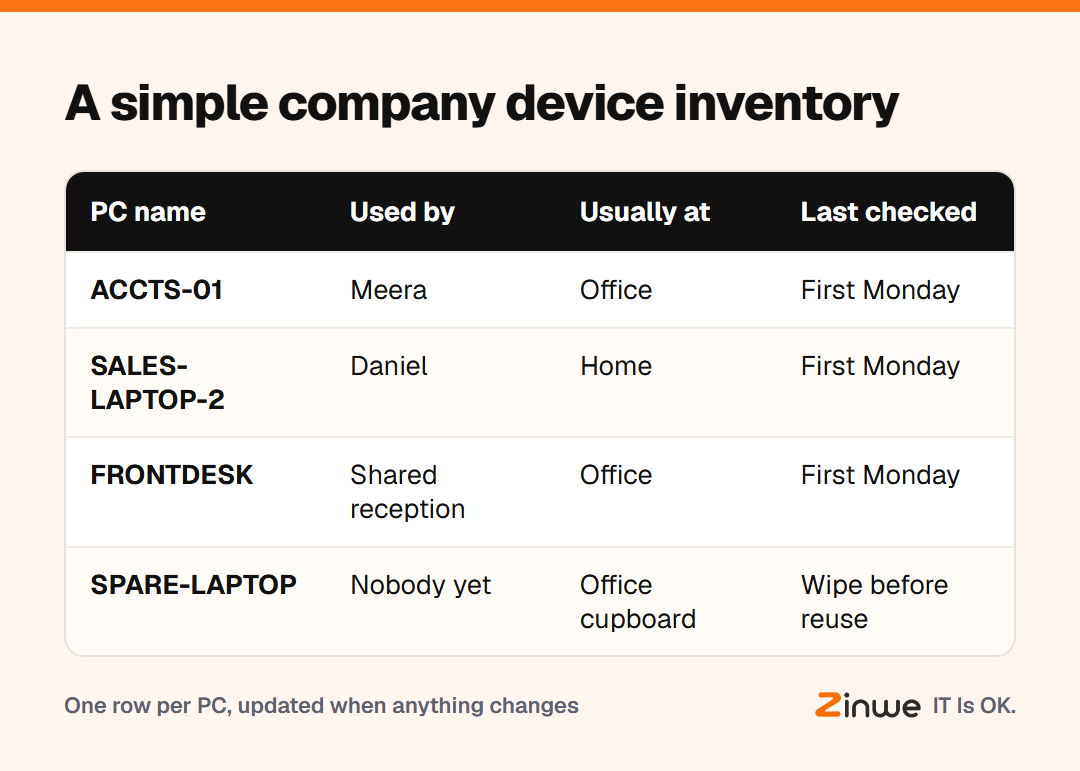
Update the list whenever someone joins, leaves or swaps a laptop. Five minutes then saves an afternoon of guessing later.
2. Use one set of rules everywhere
Write the rules once and apply them to every PC, wherever it sits:
- Updates on and screen lock after five minutes
- Admin rights for one or two people only
- The same pen drive rule: allow, read-only or block
- No remote-access tools unless you approved them
Same rules at the kitchen table and at the office desk. That is the whole idea.
3. Have one place to see what needs attention
Remote device management doesn't have to mean taking over someone's screen. For a small team, it means hearing about the few things that matter: new software, a pen drive, a large copy of files.
What does this look like in a small practice?
Take a 16-person accounting practice in Chicago with staff split between the office and home. The office manager keeps the PC list in one shared sheet and the rules on one page. She reviews alerts each morning in ten minutes. When someone new joins, she adds a row and sets their laptop to the same rules on day one. For the rules themselves, see our seven device security checks.
In short
- List every PC: name, user, location, last checked
- One set of rules, applied the same at home and in the office
- One place to see alerts, reviewed daily
In Zinwe, every Windows PC you add appears on your Team & devices page, and its alerts arrive in one dashboard, whether the PC is in the office or at home. See how to manage your team in Zinwe, or start free for 3 PCs.