Informative
Why equal access for every employee adds risk
Giving everyone access to everything feels fair and simple. Giving access by role is just as simple, and it means one mistake can't reach every file.
Zinwe team · · 3 min read
Equal access feels like trust. Everyone can open every folder, so nobody feels left out and nobody waits for permission. But it also means one wrong click, one shared password or one unhappy leaver can reach every file the business has.
Short answer: role based access control means you decide access by job, not by person. Define a few roles, such as owner, accounts, sales, support and intern, write what each role needs, and give every new person the access of their role. Nothing more, nothing less.
What is role based access control in plain words?
Instead of asking "what should Ravi see?", you ask "what does a sales person need?". Then Ravi gets the sales set. When Neha joins sales next month, she gets the same set, with no guessing.
The idea behind it is called the least privilege principle: each person has the smallest set of access that lets them do their job well.
What does access by job role look like?
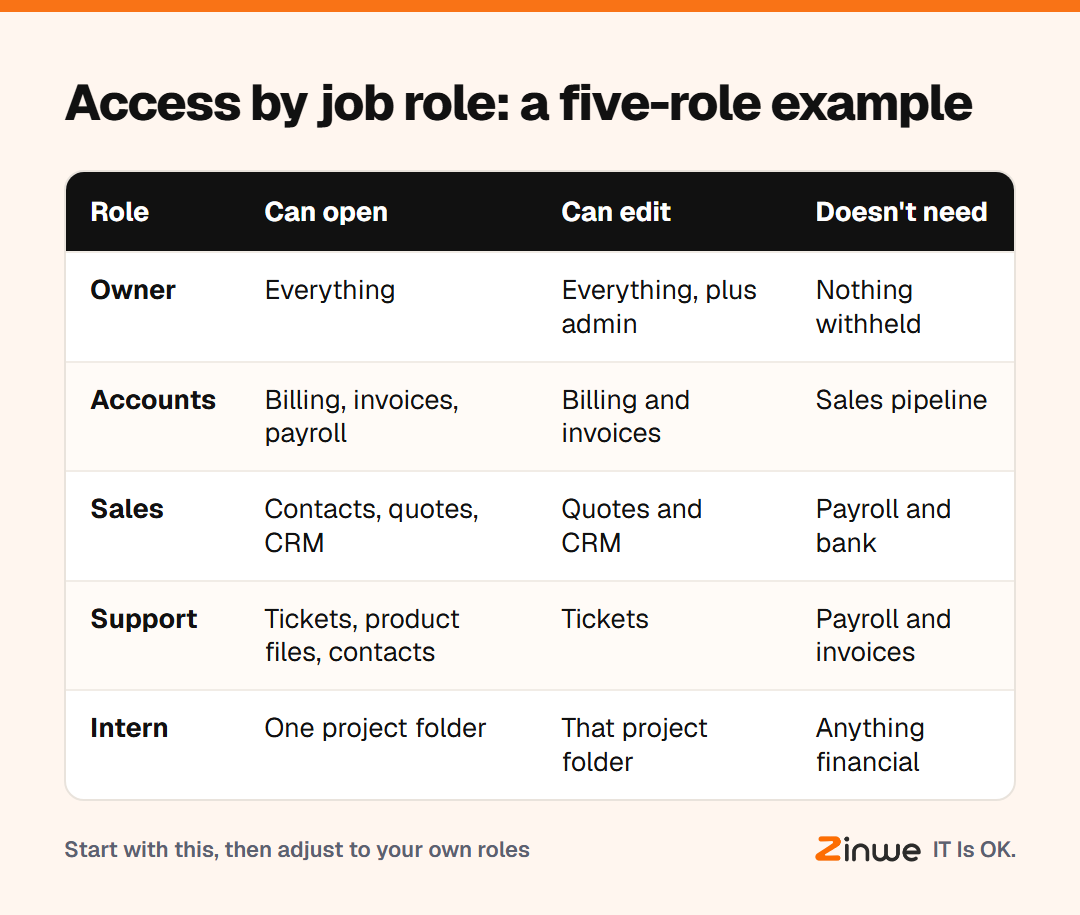
Here is a five-role example for a small office:
- Owner: everything, plus the admin and bank logins.
- Accounts: billing, invoices and payroll. Not the sales pipeline.
- Sales: customer contacts, quotes and the CRM. Not payroll or bank.
- Support: customer tickets and product files. View only on customer contacts.
- Intern: the one project folder they work on. Nothing financial.
Why is it safer, and still simple?
Three reasons:
- Mistakes stay small. An intern who deletes a folder can only delete their own project.
- Joining is quicker. You copy a role instead of deciding each folder.
- Leaving is cleaner. You remove one role, not a long list of one-off shares.
Picture a 15-person IT services shop in Hyderabad. Everyone had edit access to one big "Office" folder. The owner splits it into four folders by role and sets employee access permissions to match. It takes one Saturday morning. Since then, a new hire is set up in ten minutes, and nobody outside accounts sees salaries.
If the habit of shared everything feels familiar, our piece on why everyone having access to everything is risky has gentle ways to start. To keep roles from drifting, add a quarterly access review.
In short
- Decide access by role, not by person
- Start with five roles and write what each one needs
- Smaller mistakes, quicker joining, cleaner leaving
Zinwe doesn't set folder permissions, but it does alert you when files are copied out to a pen drive or a large transfer leaves a Windows PC, whoever holds access. Start free for 3 PCs.