Informative
Small oversights with real costs, and how to avoid them
This month's roundup: the small oversights that cause the biggest headaches, from old accounts to untested backups, with one fix for each and a link to the full guide.
Zinwe team · · 3 min read
Welcome to month two of the IT Is OK newsletter. Last month was about knowing what to protect. This month was about the small things that slip: the account nobody closed, the password used twice, the backup nobody tested.
None of them feel urgent on a busy Tuesday. That's exactly why they matter.
Short answer: to protect business data, you rarely need a big project. You need to catch the small oversights before they add up. Here are the four themes from this month, each with one fix and a link to the full guide.
Where do leaks really start?
Not with hackers, mostly. They start with copies, people and exits. Our guide on lowering the risk of a customer data leak breaks it into four layers, one action each. We also defined a data leak in plain words, with six everyday examples.
If something does go out by mistake, keep the first-hour steps after sending to the wrong person handy. Calm and quick keeps a mistake small, and protects the customer trust that small businesses run on.
Who still has access they shouldn't?
Access outlives its purpose all the time. Three guides help:
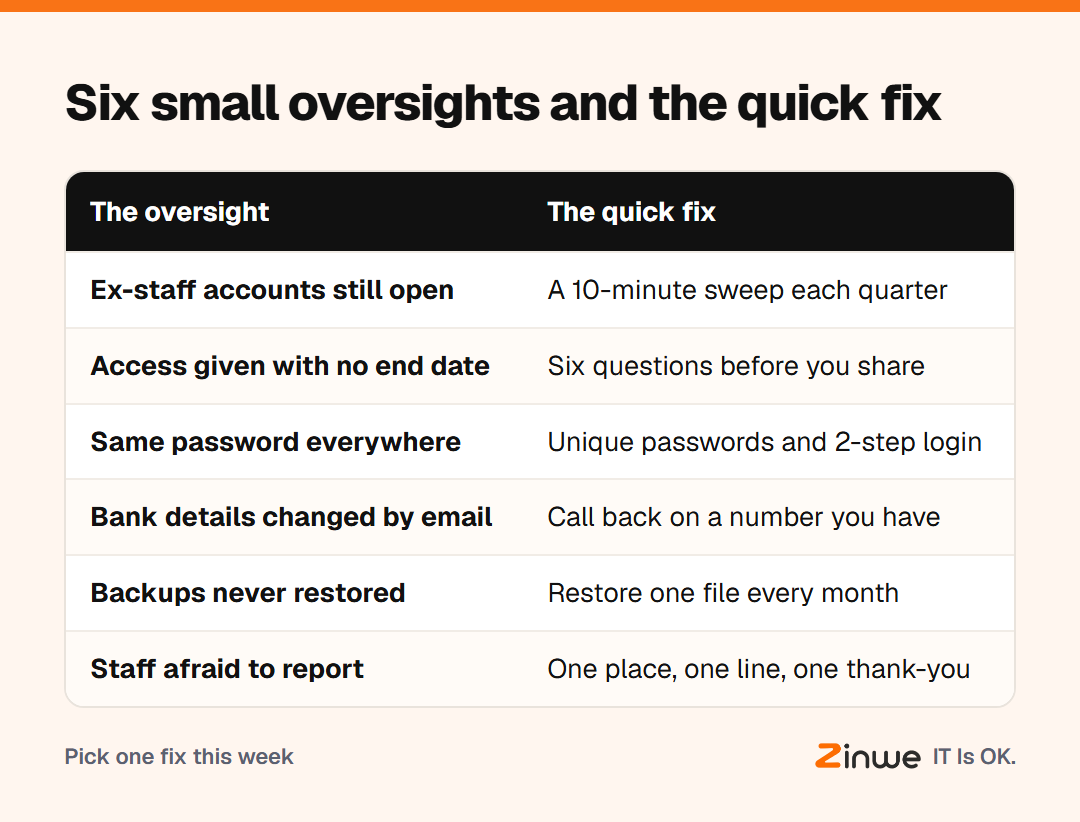
- A quarterly sweep for old employee accounts, ten minutes each time
- A six-question checklist before giving file access
- The last-day file steps when someone leaves
Which doors open from the outside?
Some risks walk in rather than out. Why one reused password can unlock many accounts explains credential stuffing simply. Five questions before a new online tool keeps free apps useful without surprises. And spotting a fake payment request comes down to one call-back rule. We also toured the one privacy setting to check in each of your team's daily apps.
Which habits protect business data day to day?
- Test your backups. Why backups matter covers the 3-2-1 rule and a monthly restore test.
- Make reporting easy. Let your team report a worry fast: one place, one sentence, one thank-you.
- Work the list. Eight data protection mistakes to fix, one a week.
Picture a 12-person accounts firm that takes one item a week from this month's posts. By the end of next month, old accounts are closed, the shared login is gone and a backup has been tested twice. No new budget, no IT team.
In short
- Leaks start small: fewer copies, fewer people, fewer exits
- Access should end when the need does
- Test backups, check payment requests, and thank people who speak up
Next month: quick checkups and a 30-day plan. Want to know when files leave a Windows PC by pen drive, network share or email? Start free for 3 PCs.